


Bill and tax payments
Pay for your bills and taxes on the Digital Banking service
It's as convenient as consulting and scanning the payment details, validating the transaction and downloading the receipt from the app.

Bill and tax payments

National bills or taxes
Personal income tax (Form 100), Tax Agency settlements and self-assessments, special duties and taxes or query already settled payments.

Municipal bills or taxes
Real estate tax, vehicle tax, municipal self-assessments, local duties and settlements or other municipal taxes.

Regional authority bills or taxes
Property Transfer Tax (ITP - Impuesto de Transmisiones Patrimoniales), rental deposits, bills of exchange, regional duties and others.

Other related payments
Bills from companies (water, electricity and gas utilities if not directly debited), payments to public agencies, university tuition fees (like the University of Malaga) and others.
* Service available to customers with access to the Digital Banking service and an operational account, as well as for paying bills from the Andalusia Regional Authority and other regional authorities Unicaja has been authorised to collect.

Bill and tax payments
Before starting...
To make the payment, you just need the tax document or bill and an operational account at Unicaja.
You can either scan the barcode or enter the data manually. Check the information before confirming the transaction and download the receipt once you have finished.
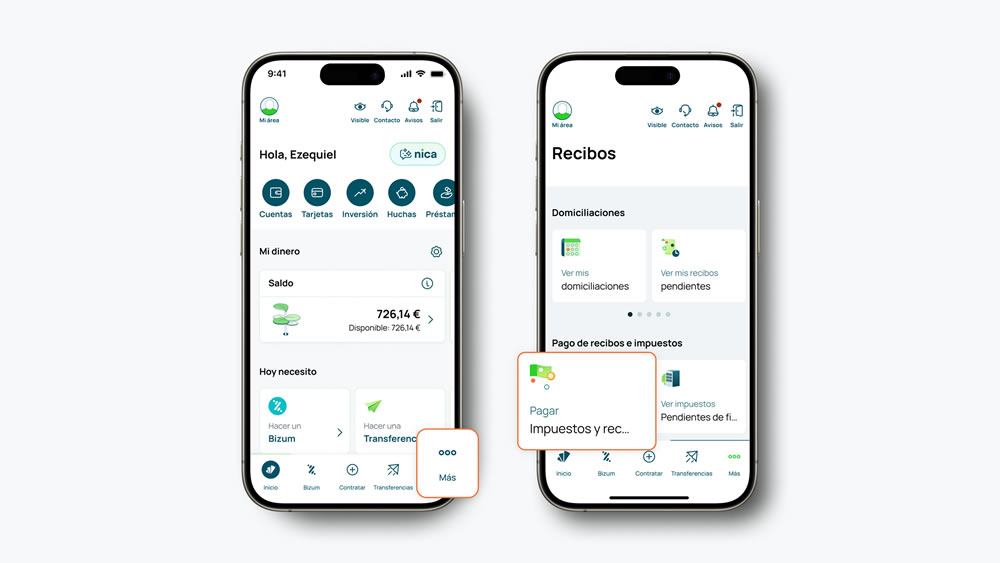
Bill and tax payments
Pay in just five steps
Go to Tax and Bill Payments from "More" in the app's lower menu and follow these steps:
- Log in to the app and go to "Tax and Bill Payments", which is located in the lower tab "More", "Bills".
- Scan the barcode using your mobile phone's camera or enter the data manually.
- Check and verify the data before confirming the transaction.
- Validate the transaction by signing with Unicaja Key.
- Download the receipt.

Access to the virtual offices of public bodies
If you are a Unicaja customer and have a Digital Banking account, you can check and pay your municipal taxes with the following public bodies by accessing their virtual offices directly using Digital Banking:
- Ayuntamiento de Almería
- Diputación de León
- APAT de la Diputación Provincial de Granada
- Patronato de Recaudación Provincial de Málaga
If you do not have access to the Digital Banking service, you can pay bills using your credit card.
Acess pay bills with card
You can pay the following institutions and organisations with your credit card (Euro 6000 Maestro, Mastercard or Visa) whether you are a Unicaja customer or not. If you are a customer, you can also make the payment through Digital Banking.
- Agencia pública de Puertos de Andalucía
- Aguas de Benahavis
- Aguas de Cádiz, S.A. (ACASA)
- Aguas y Saneamientos de Torremolinos (ASTOSAM, S.A.)
- Ayuntamiento de Cádiz (Autoliquidaciones)
- Ayuntamiento de Cádiz (Impuestos/Recibos)
- Ayuntamiento de Alhaurín de la Torre
- Ayuntamiento de Arroyo de la Encomienda
- Ayuntamiento de Fuengirola
- Ayuntamiento de Medina del Campo
- Ayuntamiento de Mijas (Autoliquidaciones)
- Ayuntamiento de Mijas (Impuestos/Recibos)
- Ayuntamiento de Úbeda
- Ayuntamiento de Vélez-Málaga
- Eléctrica de Cádiz - Comercializadora
- Empresa Municipal Aguas Benalmádena, S.A. (EMABESA)
- INSA-ETEA
- ACOSOL, S.A.
- ACOSOL, S.A. (Marbella)
- Servicios Tributarios de Ceuta (Autoliquidaciones)
- Servicios Tributarios de Ceuta (Impuestos/Recibos)
- Servicio Provincial de Gestión y Recaudación de Diputación de Jaén (Autoliquidaciones)
- Servicio Provincial de Gestión y Recaudación de Diputación de Jaén (Impuestos/Recibos)
- Malaga University
- LOYOLA SCHOOL OF LANGUAGE
- LOYOLA UNIVERSITY Andalusia
Acces to pay bills charged to account
If you are a Unicaja customer and have access to Digital Banking, you can make payments charged exclusively to your account to the following entities and organisations. Are you a customer but don't have a password? Register now.
With this service you can pay:
- Bills issued by private companies that you have not arranged direct debit with, such as electricity, water, gas, etc.
- Public bodies such as travel payments for IMSERSO.
- Municipal taxes that you do not have direct debit arrangements in your account for, such as Tax on Motor Vehicles (IVTM), Property Tax (IBI), Business Tax (IAE), etc.
- Self-assessment. Method 3:
With this service you will be able to pay municipal self-assessment. Method 3. - View and pay taxes to Almeria City Council:
The citizens of Almeria can consult and pay their municipal taxes to the council. - Consult and pay taxes to the Governmental Agency for Environmental Protection and Technical Services (APAT) of Granada Provincial Council:
The citizens of the province of Granada can consult and pay their municipal taxes to the APAT. - Consult and pay taxes to the Tax Collection and Management Department (SPGTR) of the Provincial Council of Almeria:
The citizens of Almeria can consult and pay their municipal taxes to the SPGTR. - Consult and pay taxes to the Provincial Council of Leon: The citizens of the province of Leon can consult and pay their municipal taxes.
- Provincial Tax Office Board of Malaga:
The citizens of the province of Malaga can consult and pay their municipal taxes to the Provincial Tax Office Board of Malaga.
State Taxes
Unicaja, as a collaborating entity of the Public Tax Administration, offers you the following services:
- Online tax filing with the State Agency for Tax Administration (AEAT)
This service allows online filing and payment of different tax return forms, as well as the presentation of Disclosure Statements (forms 180, 182, 188, 190, 193, 198, 294, 295, 296, 345, ...). - Payment of other taxes
This service allows for other types of payment such as settlements, self-assessments, special taxes and fees. - Claim for refund:
You can use this service to claim a refund with forms 303 and 308 - Consult your tax payments
This service allows you to see the state taxes paid in the last three months: settlements, self-assessment, fees, etc. - Cancelling a tax payment
This service allows you to cancel the payment of state taxes made on that day.
INCOME TAX
Unicaja, as a collaborating entity of the Tax Agency, allows you to make payment and confirmation of the draft of the Personal Income Tax (IRPF) return through Digital Banking:
- Personal Income Tax payment:
If your tax statement results in an amount to pay, this operation allows you to pay your IRPF tax (form 100) and obtain your receipt of payment, NRC payment code, and the option to split the payment and direct debit the second installment on a later date.
Normally, you will need to do this operation not when submitting your tax statement through Digital Banking, but directly through the AEAT website with a user certificate or at deposit-taking institutions collaborating in tax collection management (Banks, Savings Banks or Credit Cooperatives) located in Spain. - Confirmation of your income tax draft:
If you are satisfied by the draft income tax you have received at home, you can submit your tax statement by confirming the draft. By confirming your draft version and making the payment or requesting your refund, you can submit your tax statement without physically submitting the documents. This service should only be used to confirm drafts for individual income tax statements.
Check the official deadlines at the Tax Agency's Electronic Office.
Autonomous Community Taxes
This service allows for the payment of local taxes to the regional governments Junta de Andalucía and Junta de Castilla la Mancha, such as rent guarantees, vehicle transfer taxes, bills of exchange, etc.
Social Security
Unicaja, as a collaborating body of the Social Security system, makes the settlement and presentation of contributions and registrations for professionals and companies easier.
The Social Security system uses the internet in order to have a more flexible relationship with companies and professionals. It eliminates all paper documents, improving the quality of information and data, as well as avoiding long waits in Administration offices.
Through Sistema Red you can contact the Social Security Treasury Department (TGSS) directly, giving you access to company and employee data, as well as the ability to send digital contributions, sign up, register and cancel documents from the National Institute of Social Security.
Others
Under the collaboration agreement between Unicaja and the University of Malaga, you can use this service to pay enrolment fees directly from your account or your Unicaja credit card.
Tax and Bill Payments is a service that is available to customers with a Unicaja account and have access to the Digital Banking service.
The documents which are compatible to make tax and bill payments are those which have a payment reference, a barcode or are in a format accepted by the issuing administrations.
Yes, you can. Bill and tax payments are available for both mobile phones on the app and computers on the website.
Before completing the payment, you must validate the transaction by signing with Unicaja Key or with the signing method associated to your Digital Banking service.
Yes, you will. Once you have completed the payment, you can download the transaction's receipt.
If the data is not valid, the application will display a warning to you so you can check the information before continuing with the transaction.
Can we help you?
You can also contact the Bank by calling at 952 60 67 67 or through the contact form.
The telephone service hours are Monday to Saturday from 8:00 a.m. to 10:00 p.m. (except national holidays).